<?xml version="1.0" encoding="utf-8"?><feed xmlns="http://www.w3.org/2005/Atom" ><generator uri="https://jekyllrb.com/" version="4.3.4">Jekyll</generator><link href="http://nanocr.eu/feed.xml" rel="self" type="application/atom+xml" /><link href="http://nanocr.eu/" rel="alternate" type="text/html" /><updated>2025-02-03T21:11:42-06:00</updated><id>http://nanocr.eu/feed.xml</id><title type="html">nanocr.eu</title><subtitle>Jon Lech Johansen&apos;s blog.</subtitle><author><name>Jon Lech Johansen</name></author><entry><title type="html">USB-C powered Water Leak Detector</title><link href="http://nanocr.eu/2025/02/03/usbc-powered-water-leak-detector/" rel="alternate" type="text/html" title="USB-C powered Water Leak Detector" /><published>2025-02-03T10:38:00-06:00</published><updated>2025-02-03T10:38:00-06:00</updated><id>http://nanocr.eu/2025/02/03/usbc-powered-water-leak-detector</id><content type="html" xml:base="http://nanocr.eu/2025/02/03/usbc-powered-water-leak-detector/"><![CDATA[<p>I already had a battery-powered ZigBee Water Leak Detector in my utility room, but for redundancy I wanted to add a grid-powered detector (one is none and two is one).</p>

<p>Certain ESP32 variants include capacitive touch GPIOs. You can take advantage of this capability to create a Water Leak Detector running <a href="https://github.com/esphome/esphome">ESPHome</a> firmware.</p>

<p>For this use case I went with the <a href="https://shop.m5stack.com/products/m5stickc-plus2-esp32-mini-iot-development-kit?variant=44269818216705">M5StickC PLUS2</a>, an ESP32-PICO-V3-02 module in a nice case with a screen and buzzer. It’s only $20 and has a Grove port that can be used for connecting a water leak cable/rope.</p>

<p>On the M5StickC’s Grove port pin 1 is GPIO33 and pin 4 is GND. Simply solder wire 1 on a Grove cable to one of the two wires on a water leak cable and wire 4 (black) to the other one.</p>

<p>Someone already created an <a href="https://github.com/WarC0zes/m5stickc-plus2-esphome/blob/main/m5stickc-plus2.yaml">ESPHome yaml file for the M5StickC PLUS2</a> that you can use as a starting point. You’ll need to add the config below. The appropriate threshold value will depend on the specific type of water leak cable you buy. By uncommenting the setup_mode line you’ll be able to observe values in the log as you drip water drops on the cable.</p>

<p>You can use <a href="https://gist.github.com/colmbuckley/9cf05ef2fd8759268a71f8e3fd16de16">this Home Assistant blueprint</a> to automate an action upon a water leak event (such as turning off the water supply).</p>

<div class="language-plaintext highlighter-rouge"><div class="highlight"><pre class="highlight"><code>binary_sensor:
  - platform: esp32_touch
    name: "Moisture Sensor"
    device_class: moisture
    id: leak
    pin: GPIO33
    threshold: 16

esp32_touch:
  #setup_mode: true
  iir_filter: 10ms
</code></pre></div></div>

<p><img src="/images/M5StickC-water-leak.jpg" alt="M5StickC PLUS2" /></p>]]></content><author><name>Jon Lech Johansen</name></author><category term="home" /><summary type="html"><![CDATA[I already had a battery-powered ZigBee Water Leak Detector in my utility room, but for redundancy I wanted to add a grid-powered detector (one is none and two is one).]]></summary></entry><entry><title type="html">UV LED water treatment</title><link href="http://nanocr.eu/2025/01/19/uv-led-water-treatment/" rel="alternate" type="text/html" title="UV LED water treatment" /><published>2025-01-19T15:03:00-06:00</published><updated>2025-01-19T15:03:00-06:00</updated><id>http://nanocr.eu/2025/01/19/uv-led-water-treatment</id><content type="html" xml:base="http://nanocr.eu/2025/01/19/uv-led-water-treatment/"><![CDATA[<p>I use a Reverse Osmosis system for drinking water. To eliminate any risk from bacteria growth in the storage tank or filters after periods of non-use, I’ve installed a UV LED water treatment unit after the RO system. Unlike traditional UV units that use a lamp, UV LED units are virtually maintenance-free.</p>

<p>I went with AquiSense’s <a href="https://aquisense.com/products/water-treatment/pearl-aqua-micro/">PearlAqua Micro</a> 12C model. It’s the only US-made UV water treatment product I could find that’s readily available. The PearlAqua’s UV-C LEDs are rated for 5000 hours so the unit should last for many years as the LEDs are only active when water is flowing.</p>

<p>This particular model also includes a feature called UV PulseCare, which enables UV output for one second every 30 minutes to prevent biological growth within the PearlAqua Micro reactor.</p>

<p>Note that due to the nature of RO water, you should only use plastic and/or 316 stainless steel fittings for RO water. In my setup I’ve used <a href="https://www.johnguest.com/us/en">John Guest</a> push-to-connect fittings and <a href="https://www.uponor.com/en-us/products/fittings/metal-fittings/propex-stainless-steel-male-threaded-adapters">Uponor ProPEX 316 stainless steel</a> fittings.</p>

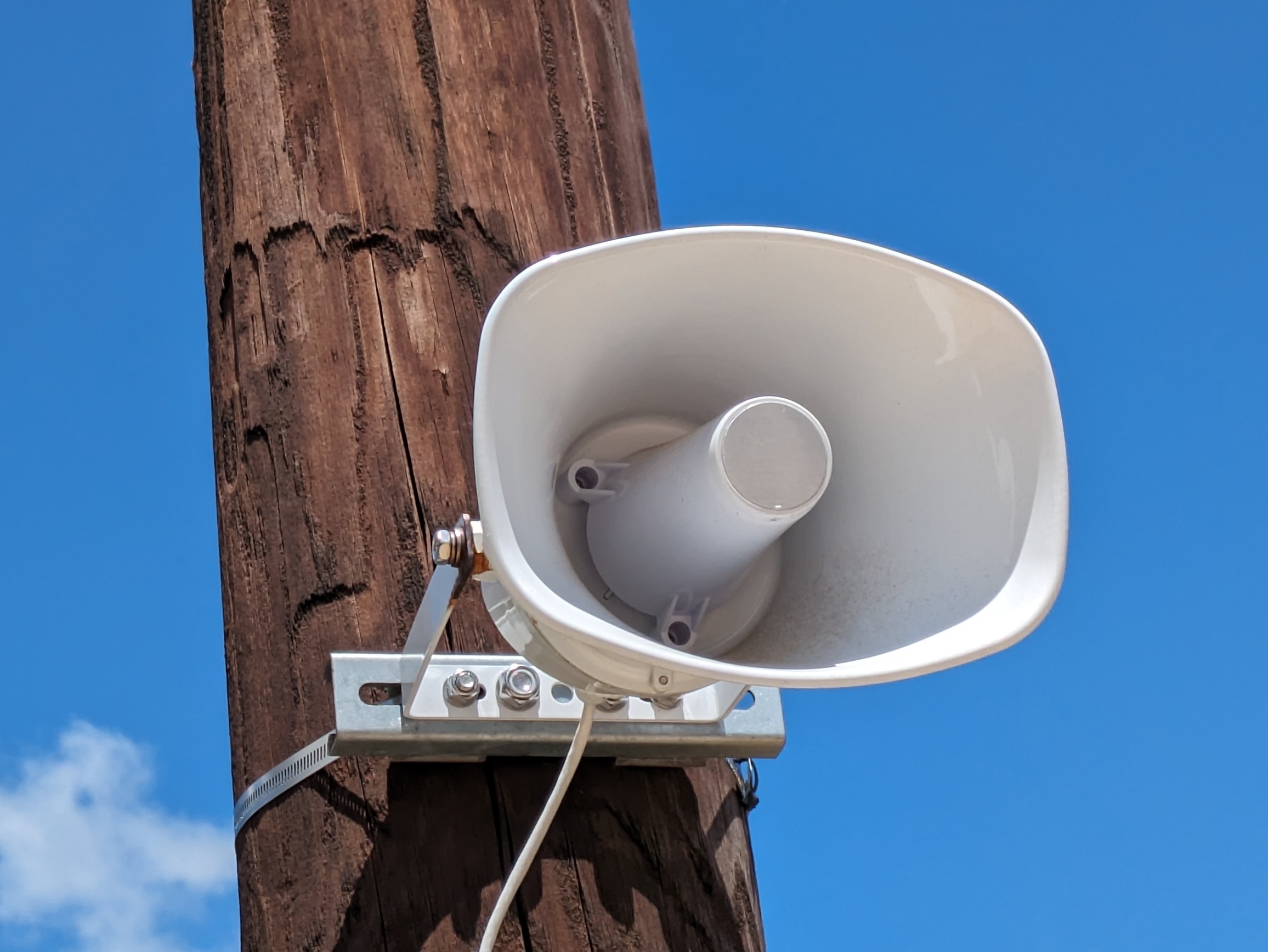
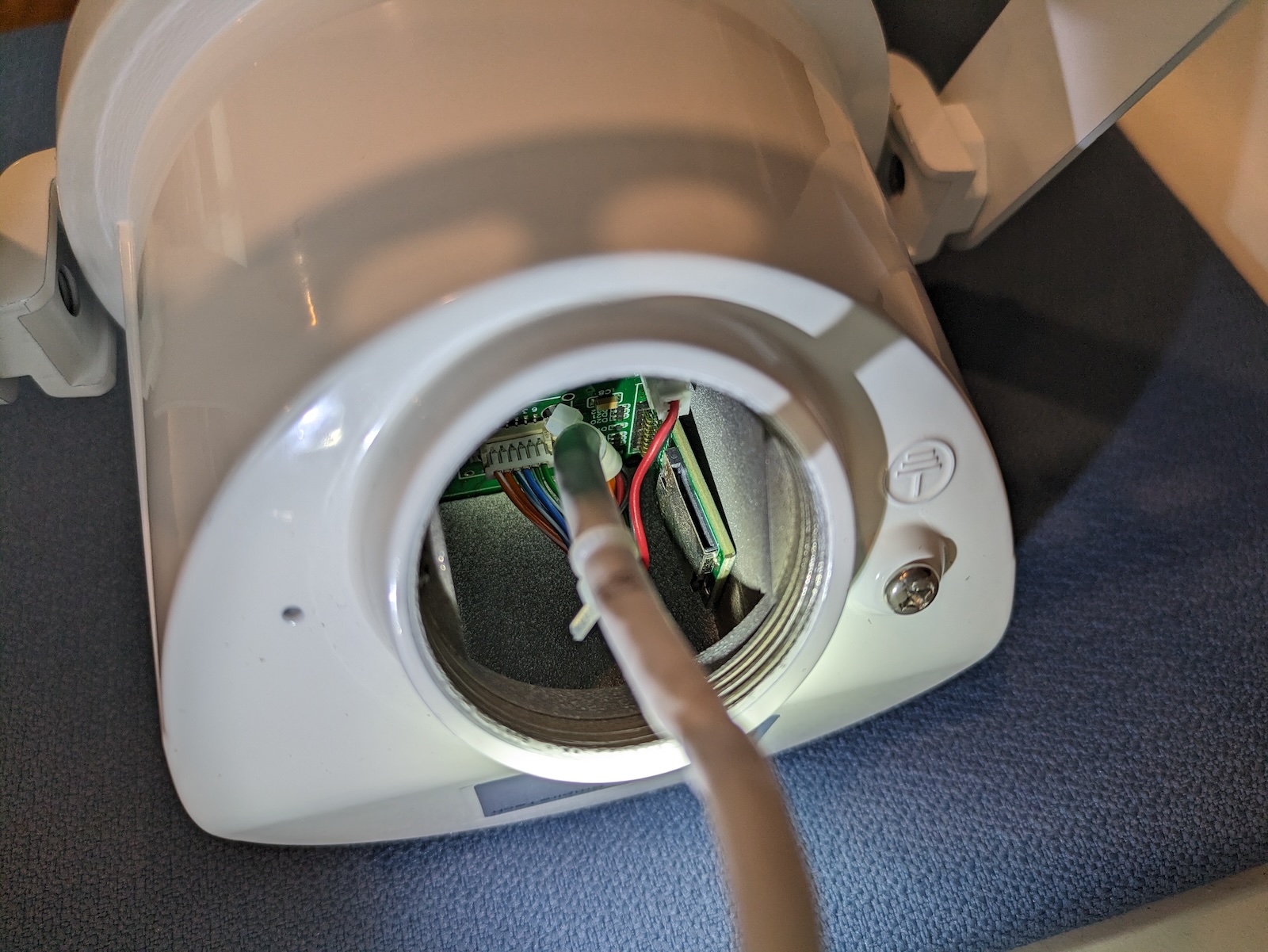
<p><img src="/images/pearlaqua.jpg" alt="PearlAqua Micro 12C" /></p>]]></content><author><name>Jon Lech Johansen</name></author><category term="home" /><summary type="html"><![CDATA[I use a Reverse Osmosis system for drinking water. To eliminate any risk from bacteria growth in the storage tank or filters after periods of non-use, I’ve installed a UV LED water treatment unit after the RO system. Unlike traditional UV units that use a lamp, UV LED units are virtually maintenance-free.]]></summary></entry><entry><title type="html">Dahua VCS-SH30 PoE speaker</title><link href="http://nanocr.eu/2024/06/24/dahua-vcs-sh30-poe-speaker/" rel="alternate" type="text/html" title="Dahua VCS-SH30 PoE speaker" /><published>2024-06-24T06:38:33-05:00</published><updated>2024-06-24T06:38:33-05:00</updated><id>http://nanocr.eu/2024/06/24/dahua-vcs-sh30-poe-speaker</id><content type="html" xml:base="http://nanocr.eu/2024/06/24/dahua-vcs-sh30-poe-speaker/"><![CDATA[<p>Earlier this year I bought the <a href="https://us.dahuasecurity.com/product/dh-vcs-sh30/">Dahua VCS-SH30 PoE speaker</a> to play music for the local wildlife.</p>

<p>It has a 15W amp, 512MB internal memory and supports expansion via MicroSD slot. I’m using a Samsung Pro Plus 128GB MicroSD and the full capacity is recognized. For pole mounting I used the <a href="https://www.polycase.com/pk-088">PK-088 kit from Polycase</a>.</p>

<p>The speaker’s SIP protocol support is pretty useless as it limits you to 8KHz audio (G.711 codec). The best audio quality is achieved by uploading MP3s to the speaker and playing from storage.</p>

<p>I’ve integrated the speaker with <a href="https://www.home-assistant.io/">Home Assistant</a> to play speech and jingles upon various events such as camera object detection.</p>

<p>You can find the source code for my Home Assistant component here: <a href="https://github.com/JonLech/hass-dahua-speaker">https://github.com/JonLech/hass-dahua-speaker</a>.</p>

<p><img src="/images/Dahua-VCS-SH30.jpg" alt="Dahua VCS-SH30 mounted on a pole" /></p>

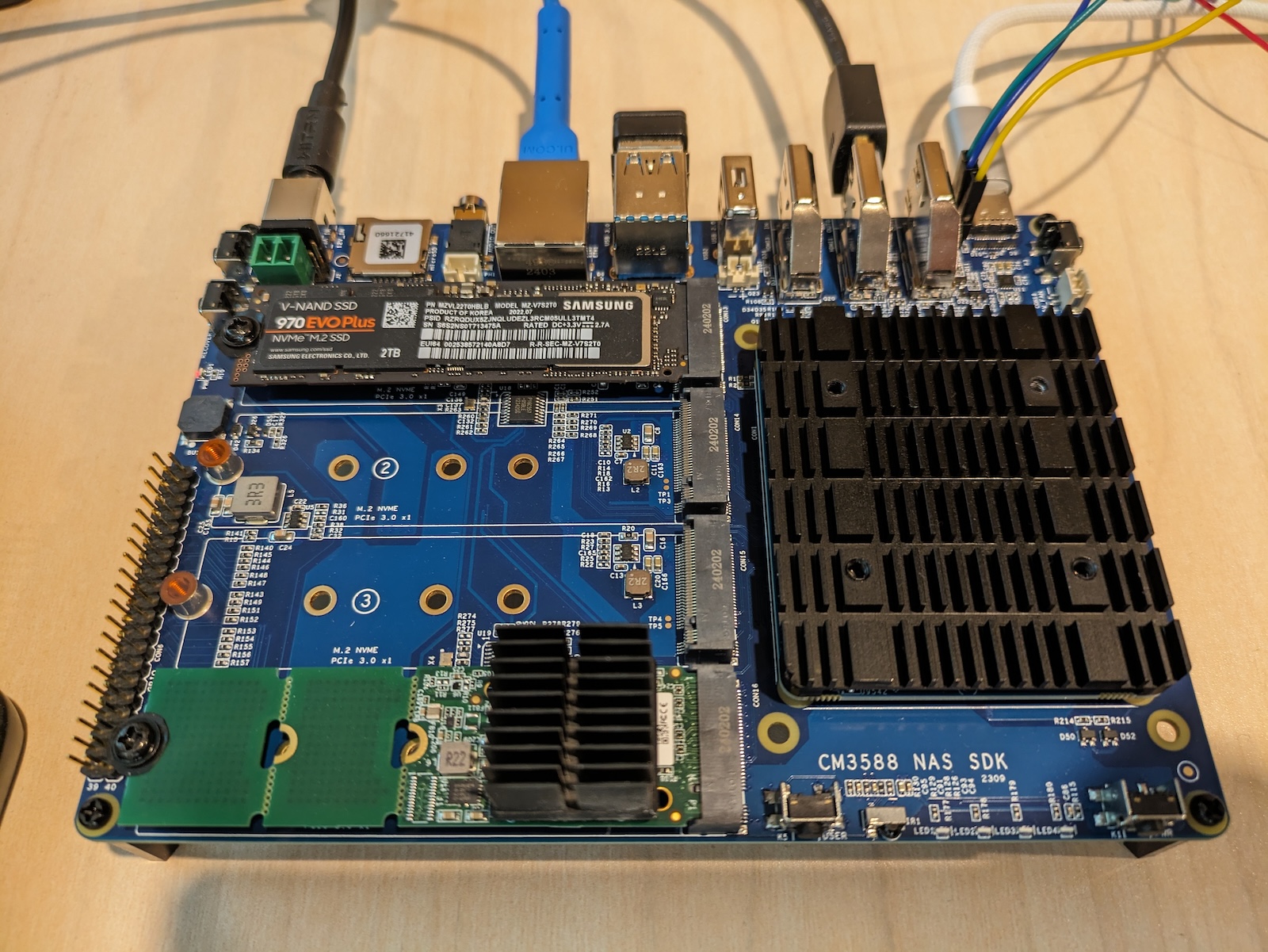
<p><img src="/images/Dahua-VCS-SH30-MicroSD.jpg" alt="Dahua VCS-SH30 MicroSD slot" /></p>]]></content><author><name>Jon Lech Johansen</name></author><category term="hass" /><summary type="html"><![CDATA[Earlier this year I bought the Dahua VCS-SH30 PoE speaker to play music for the local wildlife.]]></summary></entry><entry><title type="html">FriendlyElec CM3588 NAS</title><link href="http://nanocr.eu/2024/05/28/friendlyelec-cm3588-nas/" rel="alternate" type="text/html" title="FriendlyElec CM3588 NAS" /><published>2024-05-28T11:39:43-05:00</published><updated>2024-05-28T11:39:43-05:00</updated><id>http://nanocr.eu/2024/05/28/friendlyelec-cm3588-nas</id><content type="html" xml:base="http://nanocr.eu/2024/05/28/friendlyelec-cm3588-nas/"><![CDATA[<p>I recently bought FriendlyElec’s <a href="https://www.friendlyelec.com/index.php?route=product/product&amp;product_id=294">CM3588 NAS</a> and I’ve been evaluating it for use as a NVR. It’s one of the few (the only?) ARM SBCs that has more than two 2280 M.2 slots. With its four slots you can do three NVME SSDs and one AI accelerator like the <a href="https://hailo.ai/products/ai-accelerators/hailo-8-ai-accelerator/">Hailo-8</a>.</p>

<p>The board uses a 5.5x2.1mm DC jack (boo!), but I bought a USB-C to 12v 5.5x2.1mm cable to power it.</p>

<p>I’ve started a Yocto layer for the board here: <a href="https://github.com/JonLech/meta-cm3588-nas">https://github.com/JonLech/meta-cm3588-nas</a></p>

<p><img src="/images/cm3588nas.jpg" alt="FriendlyElec CM3588 NAS" /></p>]]></content><author><name>Jon Lech Johansen</name></author><category term="linux" /><summary type="html"><![CDATA[I recently bought FriendlyElec’s CM3588 NAS and I’ve been evaluating it for use as a NVR. It’s one of the few (the only?) ARM SBCs that has more than two 2280 M.2 slots. With its four slots you can do three NVME SSDs and one AI accelerator like the Hailo-8.]]></summary></entry><entry><title type="html">HomePod + Android #ForbiddenLove</title><link href="http://nanocr.eu/2018/02/09/homepod-android-forbiddenlove/" rel="alternate" type="text/html" title="HomePod + Android #ForbiddenLove" /><published>2018-02-09T06:00:00-06:00</published><updated>2018-02-09T06:00:00-06:00</updated><id>http://nanocr.eu/2018/02/09/homepod-android-forbiddenlove</id><content type="html" xml:base="http://nanocr.eu/2018/02/09/homepod-android-forbiddenlove/"><![CDATA[<p>14 years… It’s hard to believe, but that’s how long it’s been since Apple introduced AirPlay audio streaming (originally called AirTunes) with the release of the first AirPort Express. From <a href="https://www.apple.com/newsroom/2004/06/07Apple-Unveils-AirPort-Express-for-Mac-PC-Users/">Apple’s press release</a> in 2004:</p>

<blockquote>
  <p>AirTunes is Apple’s breakthrough music networking technology which works seamlessly with iTunes running on either Macs or PCs to let users easily create a wireless music network in their home. iTunes 4.6 automatically detects remote speakers and displays them in a simple pop-up list for the user to select. Once the remote speakers are selected, AirTunes wirelessly streams the iTunes music from the computer to the AirPort Express base station. AirTunes music is encoded to protect it from theft while streaming across the wireless music network and uses Apple’s lossless compression technology to ensure no loss of sound quality.</p>
</blockquote>

<p><a href="https://www.macworld.com/article/171937/justeport.html">Shorty after the public release</a>, I reverse engineered the AirTunes protocol and the key used to encrypt the audio stream and released JustePort, an open source AirTunes client.</p>

<p>When Apple in 2010 released iOS 4.2 with support for sending video to the 2nd gen Apple TV, they renamed AirTunes to AirPlay.</p>

<p>Since I co-founded <a href="https://www.doubletwist.com">doubleTwist</a> a decade ago, we’ve been at the forefront of restoring digital media interoperability for users trapped in walled gardens. On Android we’ve supported AirPlay since 2011 and we currently support all three major protocols (AirPlay, Chromecast and DLNA). Whether you prefer to store your music locally or in a cloud service like OneDrive or Google Drive, we’ve got you covered with <a href="https://play.google.com/store/apps/details?id=com.doubleTwist.androidPlayer">doubleTwist Player</a> and <a href="https://play.google.com/store/apps/details?id=com.doubleTwist.cloudPlayer">CloudPlayer</a>.</p>

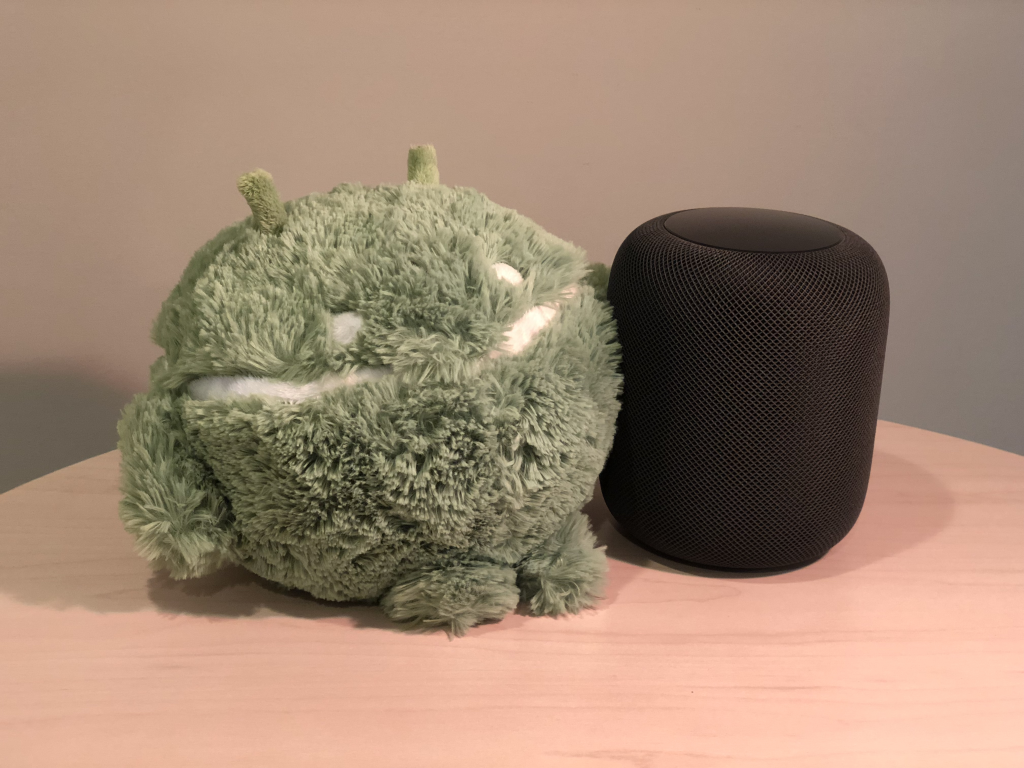
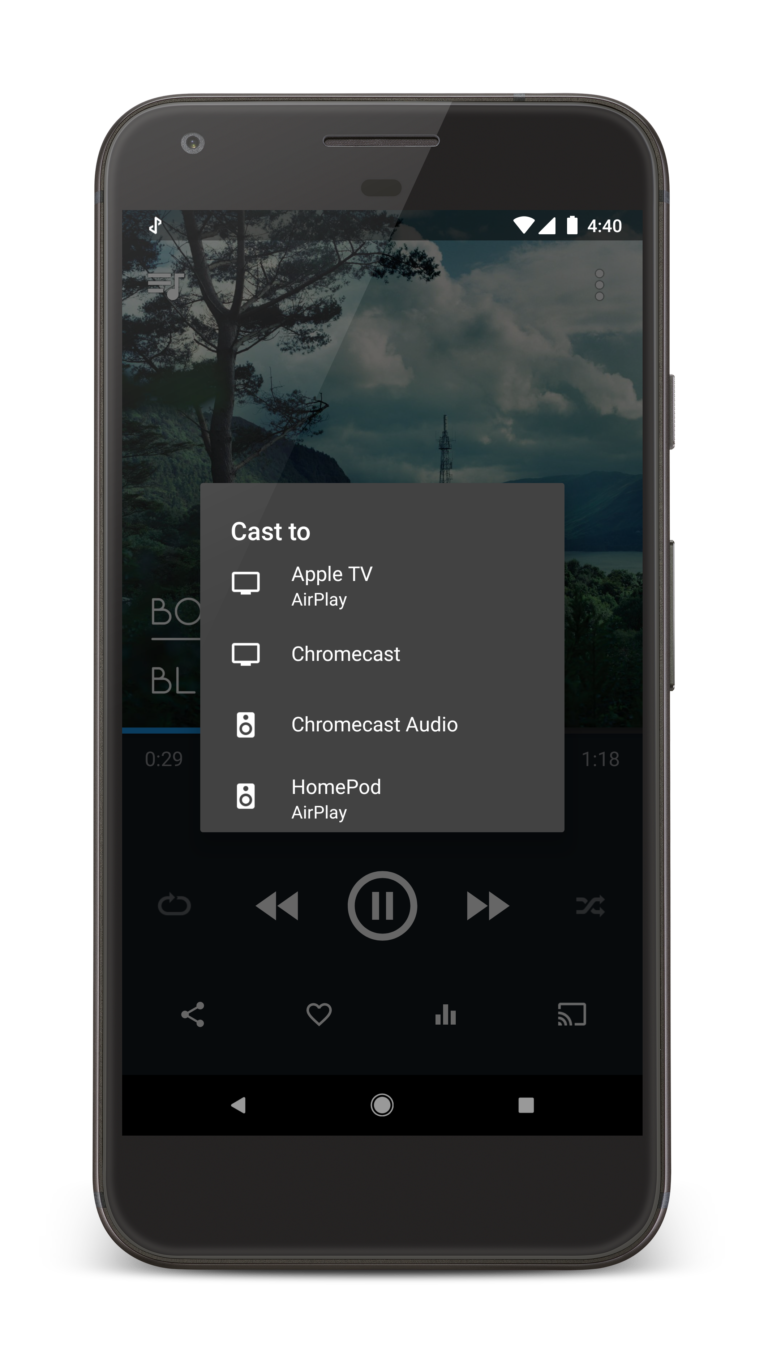
<p>Like many others, we’ve been eagerly awaiting the launch of Apple’s first AirPlay speaker. We got our hands on the HomePod today for some testing and everything works flawlessly. Anything you can play in the doubleTwist apps (local music, cloud music, podcasts, radio) can be streamed to the HomePod.</p>

<p>Currently streaming my lossless music collection stored on Microsoft OneDrive to the Apple HomePod using my Google Pixel XL – sounds amazing!</p>

<p><img src="/images/Android-HomePod.png" alt="Android HomePod" />
<img src="/images/doubleTwist-HomePod-768x1363.png" alt="doubleTwist HomePod" /></p>]]></content><author><name>Jon Lech Johansen</name></author><category term="android" /><category term="apple" /><category term="doubletwist" /><category term="reversing" /><summary type="html"><![CDATA[14 years… It’s hard to believe, but that’s how long it’s been since Apple introduced AirPlay audio streaming (originally called AirTunes) with the release of the first AirPort Express. From Apple’s press release in 2004:]]></summary></entry><entry><title type="html">5 things Google doesn’t want you to know about Play Music</title><link href="http://nanocr.eu/2015/06/16/5-things-google-doesnt-want-you-to-know-about-play-music/" rel="alternate" type="text/html" title="5 things Google doesn’t want you to know about Play Music" /><published>2015-06-16T07:00:00-05:00</published><updated>2015-06-16T07:00:00-05:00</updated><id>http://nanocr.eu/2015/06/16/5-things-google-doesnt-want-you-to-know-about-play-music</id><content type="html" xml:base="http://nanocr.eu/2015/06/16/5-things-google-doesnt-want-you-to-know-about-play-music/"><![CDATA[<ol>
  <li>When you buy an MP3 on Google Play from your Android phone, Google prevents competing apps and 3rd party developers from accessing the file using technical <em>and legal</em> means. It can only be played in Google’s Play Music app. If you thought DRM was dead, think again.</li>
  <li>Google Play Music limits the number of devices you can use to listen to your own music and only allows you to “deauthorize” 4 devices per year, including phones and tablets. In addition, each time you flash your device with a popular custom ROM such as CyanogenMod, you use up one of your authorizations.</li>
  <li>Google Play Music degrades the sound quality of lossless files such as FLAC and Apple Lossless by transcoding them to lossy MP3s.</li>
  <li>Google Play Music doesn’t allow you to share your music library with other members of your household.</li>
  <li>Once your music library is on Google’s servers, you can only download a song twice from the Play Music website back to your PC or Mac. Until the end of time.</li>
</ol>

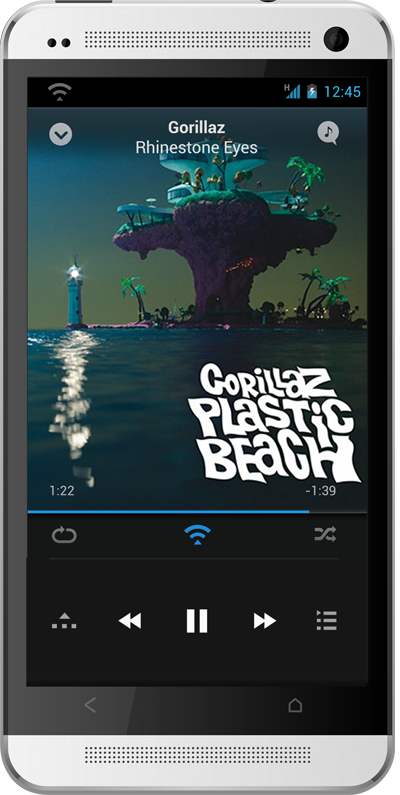
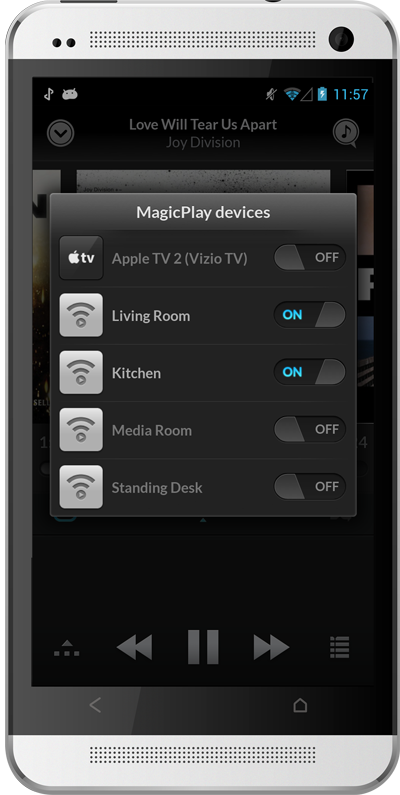
<p>Our philosophy at doubleTwist has always been to break down the walls that large corporate entities build around their platforms to lock you down. To further that goal, we’ve released a new Android app called <a href="https://play.google.com/store/apps/details?id=com.doubleTwist.cloudPlayer">CloudPlayer</a> that turns your favorite cloud storage service into a giant jukebox. Your music – no limits!</p>]]></content><author><name>Jon Lech Johansen</name></author><category term="android" /><category term="doubletwist" /><category term="drm" /><category term="music" /><summary type="html"><![CDATA[When you buy an MP3 on Google Play from your Android phone, Google prevents competing apps and 3rd party developers from accessing the file using technical and legal means. It can only be played in Google’s Play Music app. If you thought DRM was dead, think again. Google Play Music limits the number of devices you can use to listen to your own music and only allows you to “deauthorize” 4 devices per year, including phones and tablets. In addition, each time you flash your device with a popular custom ROM such as CyanogenMod, you use up one of your authorizations. Google Play Music degrades the sound quality of lossless files such as FLAC and Apple Lossless by transcoding them to lossy MP3s. Google Play Music doesn’t allow you to share your music library with other members of your household. Once your music library is on Google’s servers, you can only download a song twice from the Play Music website back to your PC or Mac. Until the end of time.]]></summary></entry><entry><title type="html">Amplify your music with MagicPlay and the Raspberry Pi</title><link href="http://nanocr.eu/2013/07/02/amplify-your-music-with-magicplay/" rel="alternate" type="text/html" title="Amplify your music with MagicPlay and the Raspberry Pi" /><published>2013-07-02T02:40:41-05:00</published><updated>2013-07-02T02:40:41-05:00</updated><id>http://nanocr.eu/2013/07/02/amplify-your-music-with-magicplay</id><content type="html" xml:base="http://nanocr.eu/2013/07/02/amplify-your-music-with-magicplay/"><![CDATA[<p><a href="http://www.magicplay.com">MagicPlay</a> is an open cross-platform audio streaming standard (think “HTTP for music”) that supports synchronized streaming to multiple speakers (like Sonos). For more details, see this <a href="http://www.theverge.com/2013/7/1/4482920/doubletwist-magicplay-service-open-source-airplay">Verge story</a>. In the near future you’ll be able to buy WiFi speakers, TVs and other products that come with MagicPlay support out of the box. If you want to try MagicPlay right now, you can turn an existing device such as the Raspberry Pi into a MagicPlay device and stream music to it using <a href="https://play.google.com/store/apps/details?id=com.doubleTwist.androidPlayer">doubleTwist Player for Android</a>.</p>

<p>Prerequisites:</p>

<ul>
  <li><a href="http://www.amazon.com/dp/B009SQQF9C/?tag=jonlech-20">Raspberry Pi</a> ($43) running <a href="http://www.raspberrypi.org/downloads">Raspbian Linux</a></li>
  <li>Optional: <a href="http://www.amazon.com/dp/B00AOH5JTQ/?tag=jonlech-20">USB sound card</a> for better quality (the integrated sound card on the Raspberry Pi has an annoying <a href="https://github.com/raspberrypi/linux/issues/128">crackle bug</a>)</li>
  <li>Speakers</li>
  <li>Android phone or tablet running Android 4.1 or higher</li>
</ul>

<p>If you would like to skip building the source code, you can download a <a href="http://download.doubletwist.com/magicplayd.tgz">binary package</a> instead.</p>

<ol>
  <li>Download the <a href="https://www.alljoyn.org/sites/default/files/resources/alljoyn-3.3.0-src.tgz">AllJoyn source code</a> (AllJoyn is a P2P framework developed by Qualcomm to power the Internet of Things).</li>
  <li>Unzip the AllJoyn code: tar -zxvf alljoyn-3.3.0-src.tgz; cd alljoyn-3.3.0-src</li>
  <li>Clone the following two repositories:
    <ul>
      <li>git clone <a href="https://github.com/alljoyn/audio">https://github.com/alljoyn/audio</a> services/audio</li>
      <li>git clone <a href="https://github.com/alljoyn/about_config">https://github.com/alljoyn/about_config</a> services/about_config</li>
    </ul>
  </li>
  <li>Apply <a href="http://download.doubletwist.com/magicplayd.diff.gz">this patch</a>: zcat magicplayd.diff.gz | patch -p0</li>
  <li>Build AllJoyn library: make OS=linux CPU=armhf VARIANT=release</li>
  <li>Build and install audio service: cd services/audio; make CPU=armhf; sudo make CPU=armhf install</li>
</ol>

<p>The MagicPlay service (/etc/init.d/magicplayd) has now been installed and will automatically start on boot.</p>

<p>Note that if you want to use a USB sound card with MagicPlay on the Raspberry Pi, you will need to modify services/audio/src/posix/ALSADevice.cc prior to step #7 and replace “plughw:0,0” with “plughw:1,0” and “hw:0” with “hw:1” (since the USB sound card would be sound card #2).</p>

<p>To get beta builds of doubleTwist Player for Android, make sure to join the <a href="https://plus.google.com/communities/114410062688956839568">doubleTwist Google Plus community</a>.</p>

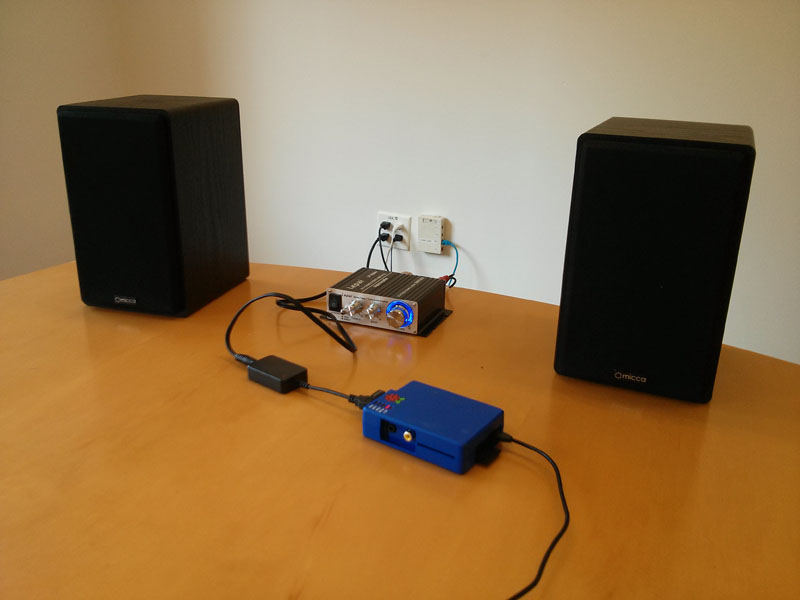
<p>The setup pictured below includes a <a href="http://www.amazon.com/dp/B0049P6OTI/?tag=jonlech-20">LP-2020A+ Lepai amplifier</a> ($20) and <a href="http://www.amazon.com/dp/B009IUIV4A/?tag=jonlech-20">Micca MB42 speakers</a> ($50).</p>

<p><img src="/images/RaspberryPi-MagicPlay.jpg" alt="RaspberryPi-MagicPlay" /></p>

<p><img src="/images/MagicPlay1.png" alt="MagicPlay1" /></p>

<p><img src="/images/MagicPlay2.png" alt="MagicPlay2" /></p>]]></content><author><name>Jon Lech Johansen</name></author><category term="android" /><category term="apple" /><category term="doubletwist" /><category term="linux" /><category term="music" /><category term="technology" /><summary type="html"><![CDATA[MagicPlay is an open cross-platform audio streaming standard (think “HTTP for music”) that supports synchronized streaming to multiple speakers (like Sonos). For more details, see this Verge story. In the near future you’ll be able to buy WiFi speakers, TVs and other products that come with MagicPlay support out of the box. If you want to try MagicPlay right now, you can turn an existing device such as the Raspberry Pi into a MagicPlay device and stream music to it using doubleTwist Player for Android.]]></summary></entry><entry><title type="html">Too many gadgets…</title><link href="http://nanocr.eu/2011/09/09/too-many-gadgets/" rel="alternate" type="text/html" title="Too many gadgets…" /><published>2011-09-09T14:54:14-05:00</published><updated>2011-09-09T14:54:14-05:00</updated><id>http://nanocr.eu/2011/09/09/too-many-gadgets</id><content type="html" xml:base="http://nanocr.eu/2011/09/09/too-many-gadgets/"><![CDATA[<p>I’m selling some gadgets that are collecting dust. Local pickup in SF only (but happy to hold an item for you if you’ll be in town in the next few weeks).</p>

<p><strong>Apple iPad 2 16GB WiFi-only: $425</strong> SOLD<br />
Comes in original box with charger and cable<br />
Mint condition - 4 months old, only lightly used approx. 2 hours/week</p>

<p><strong>Apple iPad 16GB WiFi-only: $300</strong> SOLD<br />
Comes with charger and cable<br />
Good condition - used up until I got the iPad 2</p>

<p><strong>iPhone 4 16GB Factory Unlocked: $500</strong> SOLD<br />
Comes with charger and cable<br />
Good condition - has minor scratches on the back as hiding the shiny with hideous cases is sacrilege</p>

<p><strong>Samsung Galaxy Tab 10.1” 16GB (Google I/O Limited Edition): $450</strong> CLAIMED<br />
Comes in original box with charger, cable and (unused) earphones<br />
Mint condition - less than 10 hours total use</p>

<p><strong>Samsung Series 5 3G Chromebook (Arctic White): $350</strong> SOLD<br />
Chromebook + charger + VGA adapter<br />
Mint condition - only used once</p>

<p><strong>Samsung SCH-LC11 4G Mobile Hotspot (Verizon Wireless): $175</strong> (or $125 if purchased with iPad or Galaxy Tab).<br />
New in box</p>

<p><strong>Sony A700 body w/VG-C70AM Vertical Grip: $700</strong> SOLD<br />
Includes two original Sony batteries and USB cable<br />
Good condition</p>]]></content><author><name>Jon Lech Johansen</name></author><category term="technology" /><summary type="html"><![CDATA[I’m selling some gadgets that are collecting dust. Local pickup in SF only (but happy to hold an item for you if you’ll be in town in the next few weeks).]]></summary></entry><entry><title type="html">The Men Who Stole the World</title><link href="http://nanocr.eu/2010/11/29/the-men-who-stole-the-world/" rel="alternate" type="text/html" title="The Men Who Stole the World" /><published>2010-11-29T02:06:15-06:00</published><updated>2010-11-29T02:06:15-06:00</updated><id>http://nanocr.eu/2010/11/29/the-men-who-stole-the-world</id><content type="html" xml:base="http://nanocr.eu/2010/11/29/the-men-who-stole-the-world/"><![CDATA[<blockquote>
  <p>A decade ago, four young men changed the way the world works. They did this not with laws or guns or money but with software: they had radical, disruptive ideas, which they turned into code, which they released on the Internet for free. These four men, not one of whom finished college, laid the foundations for much of the digital-media environment we currently inhabit. Then, for all intents and purposes, they vanished.</p>
</blockquote>

<p><a href="http://www.time.com/time/specials/packages/printout/0,29239,2032304_2032746_2032903,00.html">Full article in TIME</a></p>]]></content><author><name>Jon Lech Johansen</name></author><category term="copyright" /><category term="drm" /><category term="technology" /><summary type="html"><![CDATA[A decade ago, four young men changed the way the world works. They did this not with laws or guns or money but with software: they had radical, disruptive ideas, which they turned into code, which they released on the Internet for free. These four men, not one of whom finished college, laid the foundations for much of the digital-media environment we currently inhabit. Then, for all intents and purposes, they vanished.]]></summary></entry><entry><title type="html">Google’s mismanagement of the Android Market</title><link href="http://nanocr.eu/2010/06/27/googles-mismanagement-of-the-android-market/" rel="alternate" type="text/html" title="Google’s mismanagement of the Android Market" /><published>2010-06-27T19:24:12-05:00</published><updated>2010-06-27T19:24:12-05:00</updated><id>http://nanocr.eu/2010/06/27/googles-mismanagement-of-the-android-market</id><content type="html" xml:base="http://nanocr.eu/2010/06/27/googles-mismanagement-of-the-android-market/"><![CDATA[<p>Earlier this week, CNET ran <a href="http://news.cnet.com/8301-27080_3-20008518-245.html">an article</a> critical of the permission model of the Android Market. Google’s response to the criticism was that “each Android app must get users’ permission to access sensitive information”. While this is technically true, one should not need a PhD in Computer Science to use a smartphone. How is a consumer supposed to know exactly what the permission “act as an account authenticator” means? The CNET opinion piece “<a href="http://news.cnet.com/8301-17852_3-20008253-71.html">Is Google far too much in love with engineering?</a>” is quite relevant here.</p>

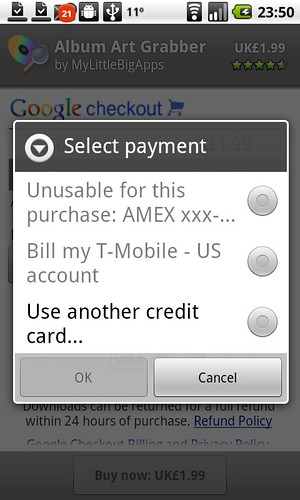
<p>Google does <a href="http://blogs.forbes.com/firewall/2010/06/25/google-flips-kill-switch-deletes-and-downplays-botnet-demo-android-apps/">far too little curation</a> of the Android Market, and it shows. Unlike Apple’s App Store, the Android Market has few high quality apps. A <a href="http://larvalabs.com/blog/android/android-market-payouts-total-2-of-app-stores-1b/">study by Larva Labs</a> (the developers of the excellent <a href="http://apps.doubletwist.com/SlideScreen/-3802745432244419429">Slidescreen app</a>) estimates that Apple has paid out 50 times more money to developers than Google has. While the Android Market is <a href="http://market.android.com/support/bin/answer.py?answer=138294">available in 46 countries</a>, developers can only offer paid apps in 13 countries (for instance, Canada has only had access to paid apps since March 2010). In addition, the price for foreign apps is not displayed in the user’s local currency and developers do not have the option of customizing pricing by country. To make matters worse, you can’t pay for foreign apps using your Amex card or <a href="http://market.android.com/support/bin/answer.py?hl=en&amp;answer=167794">carrier billing</a>. There’s also no support for in-app payments and changelogs (to communicate app changes).</p>

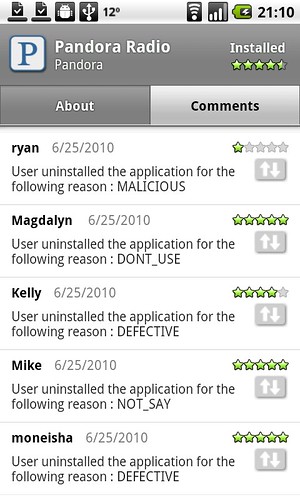
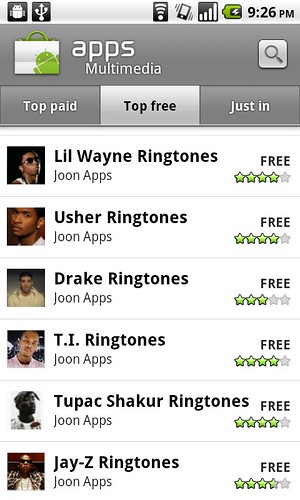
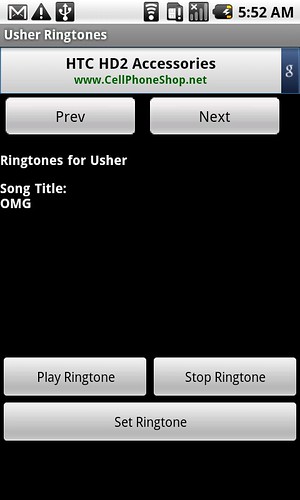
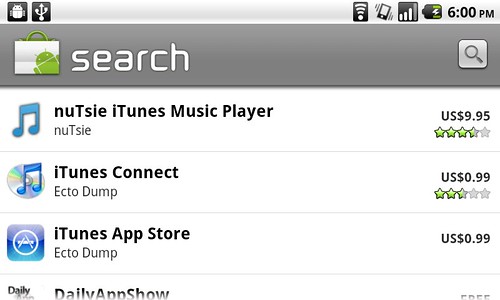
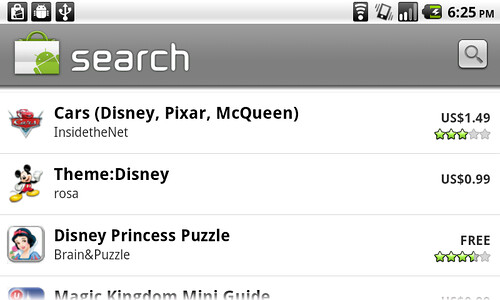
<p>Below are just a few examples of what’s wrong with the Android Market. Those <a href="http://apps.doubletwist.com/search?q=joon+apps">144 spam ringtone apps</a> (which are clearly infringing copyright) are currently cluttering the top ranks of the Multimedia category. I was not surprised to find that they were being monetized through Google Ads.</p>

<p><img src="/images/4734276627_425552d127.jpg" alt="" /> <img src="/images/4734926780_f80237c9e5.jpg" alt="" /> <img src="/images/4734416901_6b5180ba07.jpg" alt="" /> <img src="/images/4734493131_c1c94ba776.jpg" alt="" /></p>

<p>Trademark and copyright infringement is widespread in the Android Market:</p>

<p><img src="/images/4736685931_a663201a7c.jpg" alt="" /> <img src="/images/4737347788_c89c226cf4.jpg" alt="" /></p>

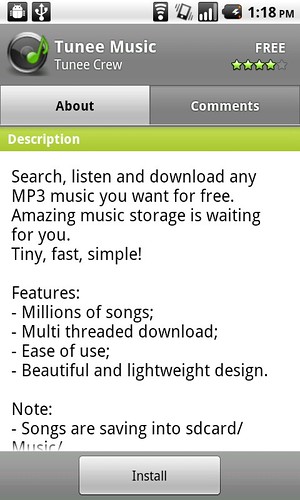
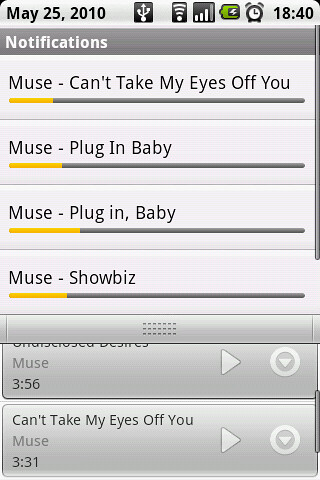
<p>The music downloading app “Tunee” (one of many such apps) is one of the Top Free apps in the Multimedia category with more than 250k downloads. While some would dishonestly try to pretend that such apps are meant for downloading public domain classical music, the developers of Tunee are very clear about their intent. Their screenshot shows copyrighted music by the band Muse (Warner Music Group) being illegally downloaded.</p>

<p><img src="/images/4739920738_519ec86498.jpg" alt="" /> <img src="/images/4739286407_4b8759bc39.jpg" alt="" /></p>

<p>These apps are damaging to companies that are building legitimate Android music apps (e.g Rdio, Spotify and MOG), not to mention Amazon whose MP3 store comes bundled with most Android phones in the U.S. Is Google’s strategy to turn a blind eye to illegal music downloading until they launch their own music store?</p>

<p>Developers and <a href="http://www.google.com/support/forum/p/Android+Market/thread?tid=26be0d4a4cfae4de&amp;hl=en">users</a> are getting fed up and it’s time for Google to clean up the house.</p>

<p><a href="http://www.twitter.com/jonlech">Follow me on Twitter</a></p>]]></content><author><name>Jon Lech Johansen</name></author><category term="android" /><category term="apple" /><category term="copyright" /><category term="security" /><category term="technology" /><summary type="html"><![CDATA[Earlier this week, CNET ran an article critical of the permission model of the Android Market. Google’s response to the criticism was that “each Android app must get users’ permission to access sensitive information”. While this is technically true, one should not need a PhD in Computer Science to use a smartphone. How is a consumer supposed to know exactly what the permission “act as an account authenticator” means? The CNET opinion piece “Is Google far too much in love with engineering?” is quite relevant here.]]></summary></entry></feed>